

Amazon Brand Story
What Is an Amazon Brand Story and How Does It Boost Your Sales?
An Amazon Brand Story is a dedicated section on your product detail page where you can share your brand’s values, history, and product range with shoppers. It appears on every listing you own through Amazon Brand Registry and, when done well, helps increase conversion rates, build customer trust, and unlock access to Premium A+ Content.
What Exactly Is an Amazon Brand Story?
Brand Story is a feature available to sellers and vendors enrolled in Amazon Brand Registry. It sits on your product detail page, just below the bullet points and above the main product description and any A+ Content you’ve added.
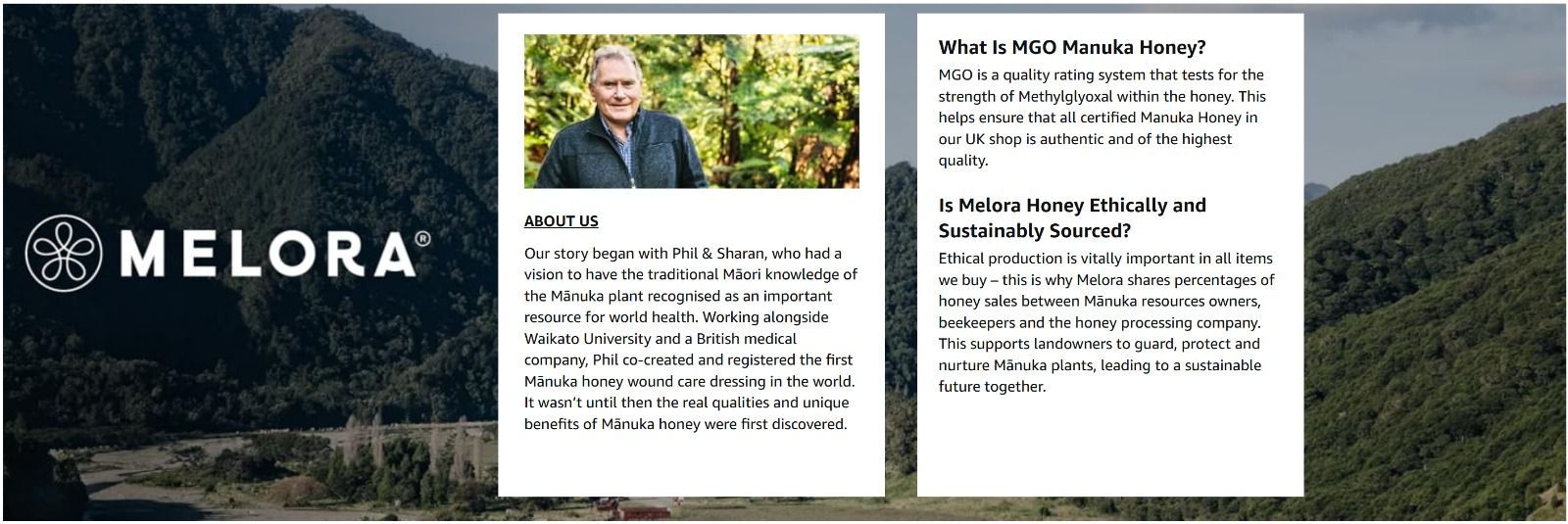
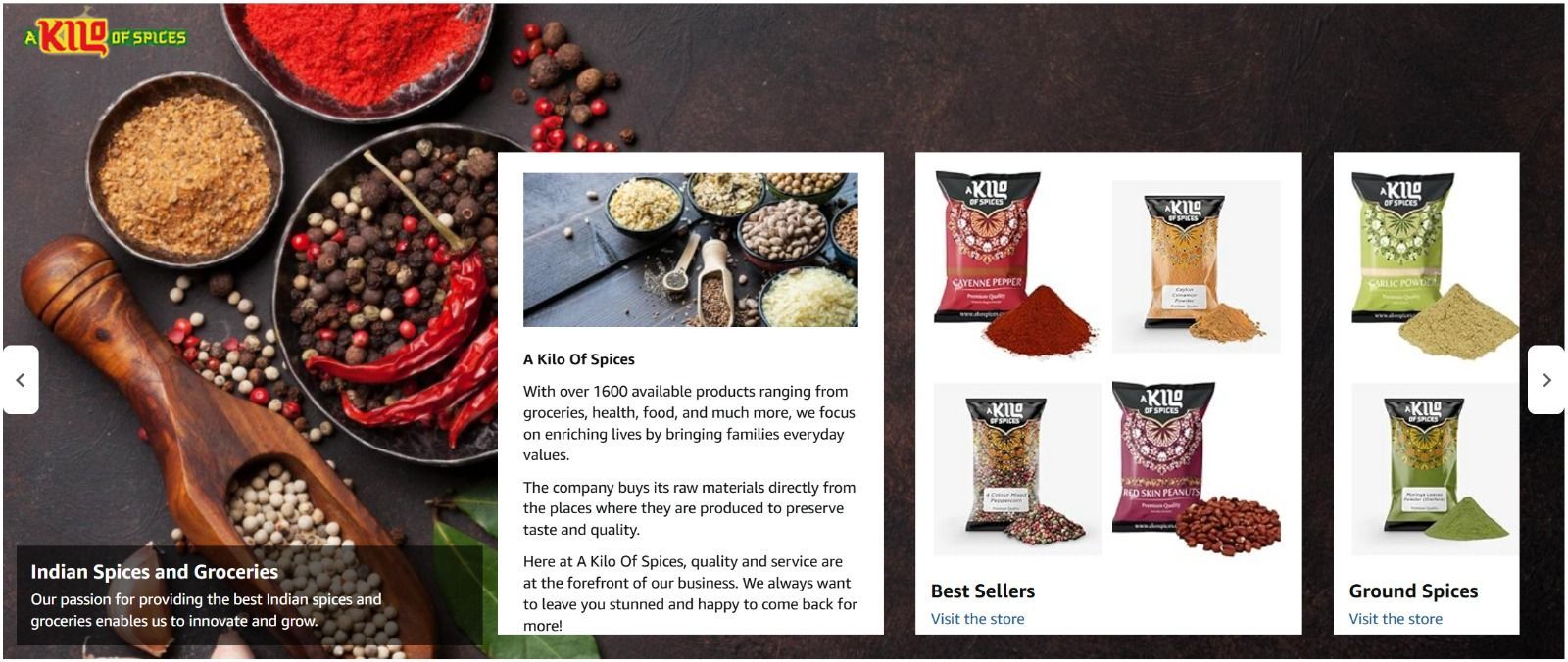
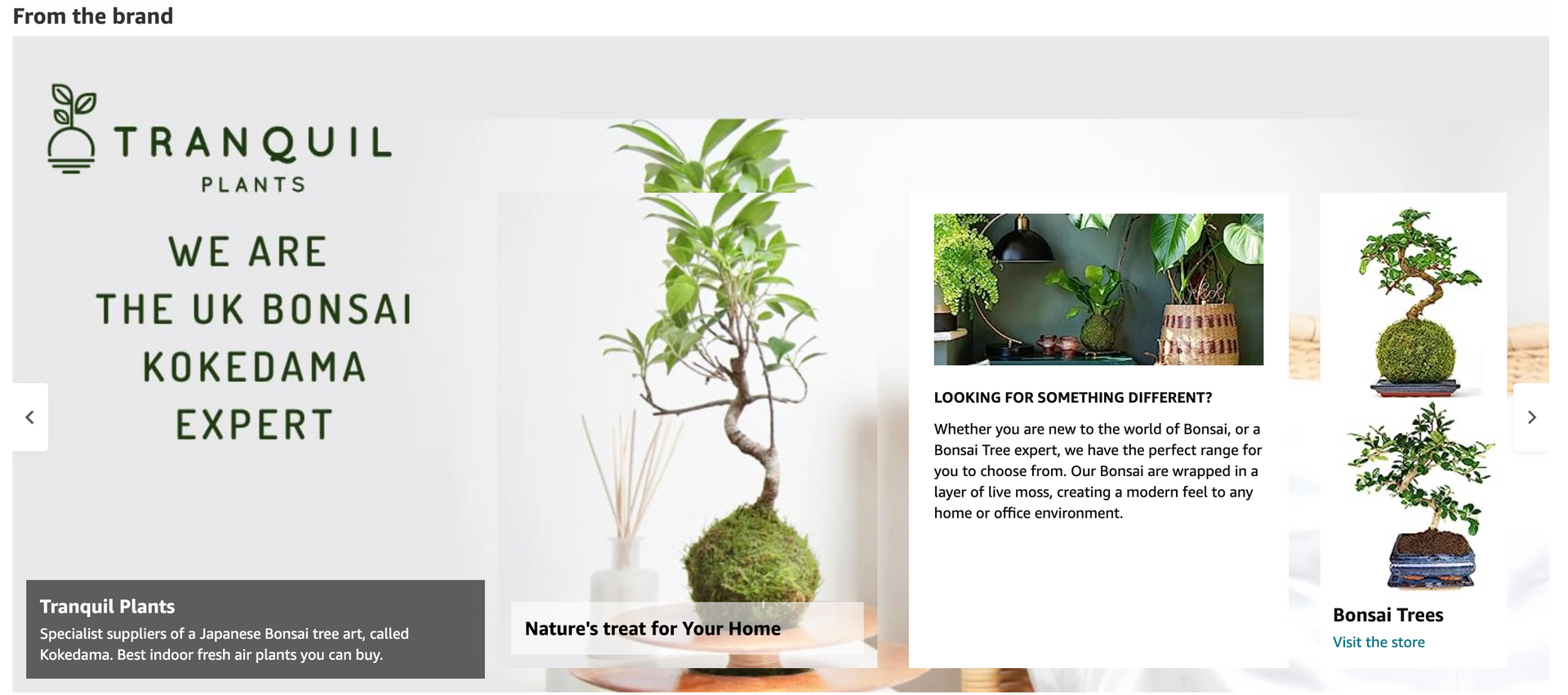
Think of it as a mini “about us” page that appears on every one of your product listings automatically. It includes a scrollable carousel of image and text cards where you can tell shoppers who you are, what your brand stands for, and what other products you sell.
At Kangaroo UK, we’ve built Brand Story sections for Amazon sellers across a range of product categories. The brands that use Brand Story effectively see stronger engagement on their listings because shoppers spend more time on the page and are more likely to browse additional products in the range. It’s one of the areas we focus on as part of our Amazon Account Management service.
Does an Amazon Brand Story Actually Increase Sales?
Yes. Brand Story contributes to conversions in three ways.
First, it builds trust. Shoppers who can see the story behind a brand are more confident in their purchase. Amazon’s own data shows that A+ Content (which Brand Story is part of) can increase sales by up to 20% on average.
Second, it keeps shoppers in your ecosystem. The carousel cards in Brand Story can link directly to your other products and your Amazon Brand Store. Instead of a customer clicking away to a competitor, they’re browsing more of your range.
Third, it unlocks Premium A+ Content for free. Amazon requires brands to have a published Brand Story before granting access to Premium A+ Content features like interactive comparison charts, video modules, and enhanced image layouts. Without Brand Story, you’re leaving these tools on the table.
In the accounts we manage at Kangaroo UK, we’ve seen listings with well-crafted Brand Story and A+ Content consistently outperform those without — particularly in competitive categories where multiple sellers offer similar products and the brand story becomes the differentiator.
What Can You Include in Your Brand Story?
Amazon provides several module types you can mix and match within Brand Story. You can use up to 19 cards in a single carousel, though most effective Brand Stories use between 4 and 8.
Brand Introduction Card - This is your headline module. It includes a background image, your brand logo, and a short text block introducing your brand. Keep this punchy: who you are, what you do, and why it matters. Shoppers won’t read an essay here.
Product Showcase Cards - These link directly to specific products or product groups (ASINs). Use them to highlight your bestsellers, new launches, or complementary products. Each card includes an image and a short description.
Brand Q&A Card - This lets you select and answer up to three common questions about your brand or products. It’s a good place to address things like your sourcing, materials, sustainability credentials, or warranty — anything that helps a shopper feel confident about buying.
The carousel scrolls horizontally on both desktop and mobile, giving shoppers a smooth browsing experience without cluttering the page.
How Do I Create an Amazon Brand Story?
Setting up Brand Story is straightforward, but getting it right requires thought about what your brand actually wants to communicate. Here’s the process:
Step 1: Log in to Amazon Seller Central (or Vendor Central if you’re a vendor) and navigate to the A+ Content Manager under the Advertising tab.
Step 2: Click “Start Creating A+ Content” and select “Create a Brand Story.”
Step 3: Choose your modules. Start with the Brand Introduction Card, then add Product Showcase Cards for your key products.
Step 4: Upload your images and write your copy. Keep it concise and benefit-focused — shoppers scan, they don’t read.
Step 5: Apply it to your ASINs. Brand Story can be published across all the ASINs you own in Brand Registry. You don’t need to create a different one for each product, though you can if your brand has distinct product lines.
Step 6: Submit for review. Amazon typically reviews and approves Brand Story submissions within 7 days, though it can be faster.
A word of caution: Amazon allows a maximum of 20 pending submissions at any one time. If you’re managing a large catalogue, plan your submissions in batches.
What Are the Most Common Brand Story Mistakes?
In the Amazon accounts we audit at Kangaroo UK, we see the same Brand Story mistakes repeatedly. These overlap with many of the common mistakes Amazon sellers make more broadly:
- Writing too much text. Shoppers scroll quickly. If your Brand Introduction Card reads like a company history essay, they’ll skip past it. Lead with your strongest message in one or two sentences.
- Using low-quality images. Brand Story is a visual feature. Pixelated logos, poorly cropped product shots, or generic stock images undermine the entire purpose. Invest in professional imagery.
- Not linking to products. Every Product Showcase Card should link to a live, in-stock ASIN. If a card links to an out-of-stock product or a dead page, you’re wasting the opportunity and frustrating the shopper.
- Setting it and forgetting it. Your Brand Story should evolve as your product range grows. Review it quarterly — add new products, update imagery, refresh the messaging to reflect seasonal campaigns.
Do I Need an Agency to Create My Brand Story?
You don’t have to, the setup process in Seller Central is manageable for most sellers. But the difference between a Brand Story that exists and one that actually drives results comes down to three things: the quality of the images, the sharpness of the copy, and how it works alongside your wider listing strategy.
At Kangaroo UK, Brand Story is part of the listing optimisation work we do for every Amazon client. We don’t treat it as a standalone task — it’s built into the broader strategy alongside A+ Content, product photography, keyword research, and Amazon PPC. That joined-up approach is what makes the difference.
Our in-house creative design team handles the imagery and layout, while our Amazon specialists write the copy based on competitor analysis and search data. We also have our own in-house photographer for product and lifestyle shots.
The result is a Brand Story that looks professional, communicates clearly, and supports your conversion goals.
Want help with your Amazon Brand Story?
Our Amazon specialists can build your Brand Story, A+ Content, and full listing strategy. Book a free Amazon account review or call us on 01530 560177.
Author
Kangaroo UK Amazon Team - Kangaroo UK is a full-service digital agency based in Leicestershire, managing Amazon Seller and Vendor Central accounts for brands across the UK. Our Amazon specialists handle account management, PPC advertising, listing optimisation, Brand Story, A+ Content, and product photography.