

Complete Guide To Fixing Amazon HFSS Issues

Abhilav • November 14, 2022

Amazon HFSS Suppressed Listing

This is a step-by-step guide to help sellers resolve HFSS listing suppression issues. In this guide we explain why you have been hit with a HFSS suppression, what is HFSS and the best and fastest way to fix the problem so you can start selling again.

Why have I been affected by the HFSS update?

If you are reading this blog, you’ve probably been affected by the HFSS algorithm update that was rolled out on the 1st of October 2022, where many food brands will be restricted from selling and advertising their products on Amazon. This has been a game-changer affecting everyone who sells in this field.
On the 26th of September 2022 Amazon sent an email to all Sellers stating as of the 1st October
in line with the new regulations in the UK, less healthy products that are categorised as HFSS (High Fat, Salt, Sugar) will no longer be allowed to be promoted, advertised or appear on Amazon search results unless a customer specifically searches for them. Not every Seller received this email, and those that did found the message very unclear, leaving many sellers confused.

Useful information and resources

What does HFSS stand for?

 HFSS is a shortened term for food and beverage products which are high in saturated fat, salt and sugar. It’s a description attributed to certain foods.

What are HFSS Products?

The Department of Health has a Nutrient Profiling Model (NPM) which is used to establish the HSFF score for a particular product. 


Foods that score 4 or more and drinks that score 1 or more are categorised as HFSS products.
Department of Health: Nutrient Profiling Technical Guide.

What happens if I don’t update my Amazon listings with HFSS information?

The affected Amazon listings will be suppressed, your products in organic search will not be displayed and your affected products will not be advertised, which will ultimately affect sales.

 What information do I need to update to remove the HFSS suppression?

 In line with UK advertising guidelines Amazon has updated the nutritional values for selected products being advertised on Amazon.


These values include the following:


  1. Serving size.
  2. Serving size unit of measurement.
  3. Energy content.
  4. Fat.
  5. Saturated fat.
  6. Carbohydrates.
  7. Sugars.
  8. Protein.
  9. Salt per serving.
  10. Carbohydrate unit.
  11. Energy unit.
  12. Fat unit.
  13. Dietary fibre. 
  14. Protein Unit.
  15. Carbohydrates Unit.
  16. Monounsaturated fat (optional).
  17. Polyunsaturated fat (optional).

 Why flat file update for HFSS is the way to go

Typically, whenever a listing update has been requested the the easiest way to do this is by updating it through the ' Edit ' option under ‘ Manage All Inventory ’.
However, when a listing has been suppressed by HFSS we cannot make the required changes because the backend  does not accept the new values.

You will see all the mandatory attributes on red rectangles that could not accept an update, so we need to update it via a flat file. 
Another advantage of doing inventory updates using a flat file is we can update a number of listings in the same category at the same time. This can save a lot of time. If you are able to updating each listing one by one can take a lot of time.

So, let's get started with the method to Fix HFSS using Flat File Inventory Update.

Step-by-step instructions on how to fix an Amazon HFSS listing suppression

This is a step-by-step guide to fixing an Amazon HFSS listing suppression. If your listings have been suspended due to HFSS then you have to first gather all the nutritional information from the manufacturer and then proceed with the flat file update as follows.


STEP 1


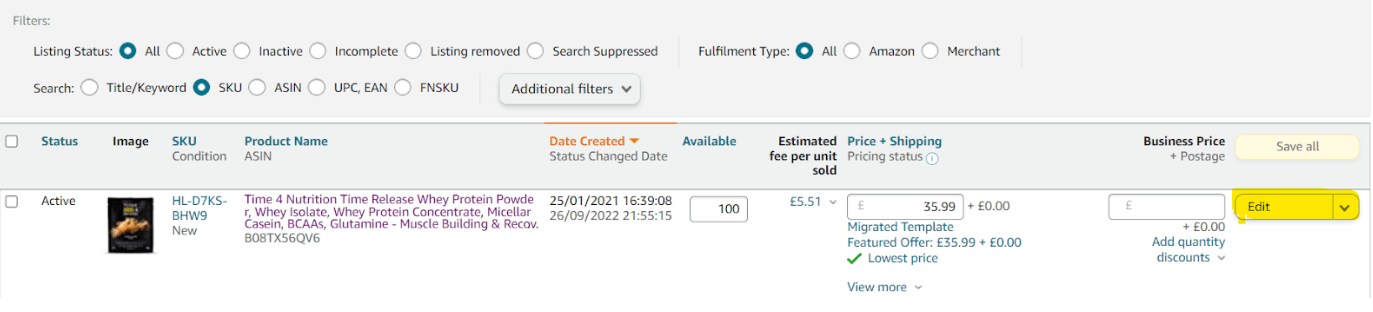
Go to the ‘Manage All Inventory’ Tab in the Seller Central account. Paste the ASIN/SKU of the product which you need to update the HFSS for and then click on ‘Edit’.
STEP 2


Now you will be directed to the edit window. Click on the ‘Vital Info’ sniTab as shown below.

STEP 3


Locate ‘Recommended Browse Nodes’ and note down the exact node flow.
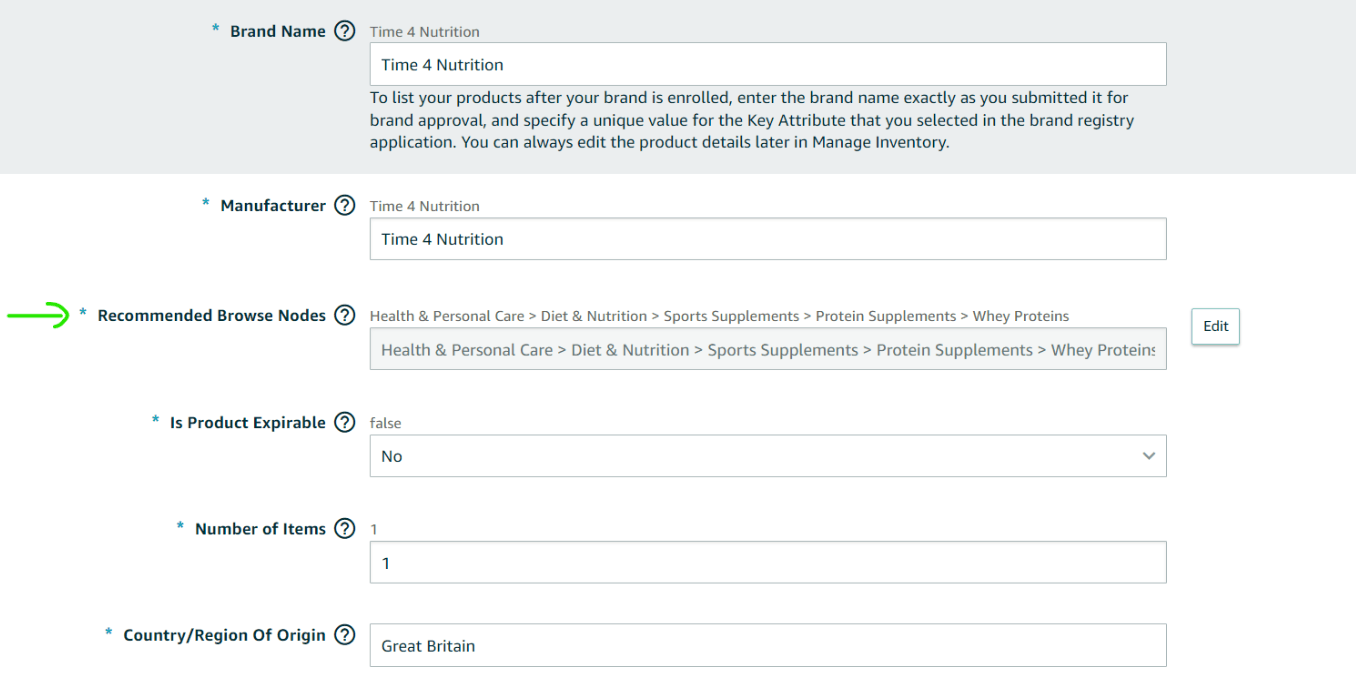
In order to download the flat file, it is necessary to know the product category.
For this ASIN, the product category is ‘Health & Personal Care’. Since there are lots of products which can fall under this category it is, therefore, necessary to note down all the sub-categorisation in order to identify the best suited sub-category for this product


STEP 4


Downloading the template file and updating HFSS information. Go to the main navigation menu and locate ‘Add Products Via Upload’ under ‘Catalogue’.
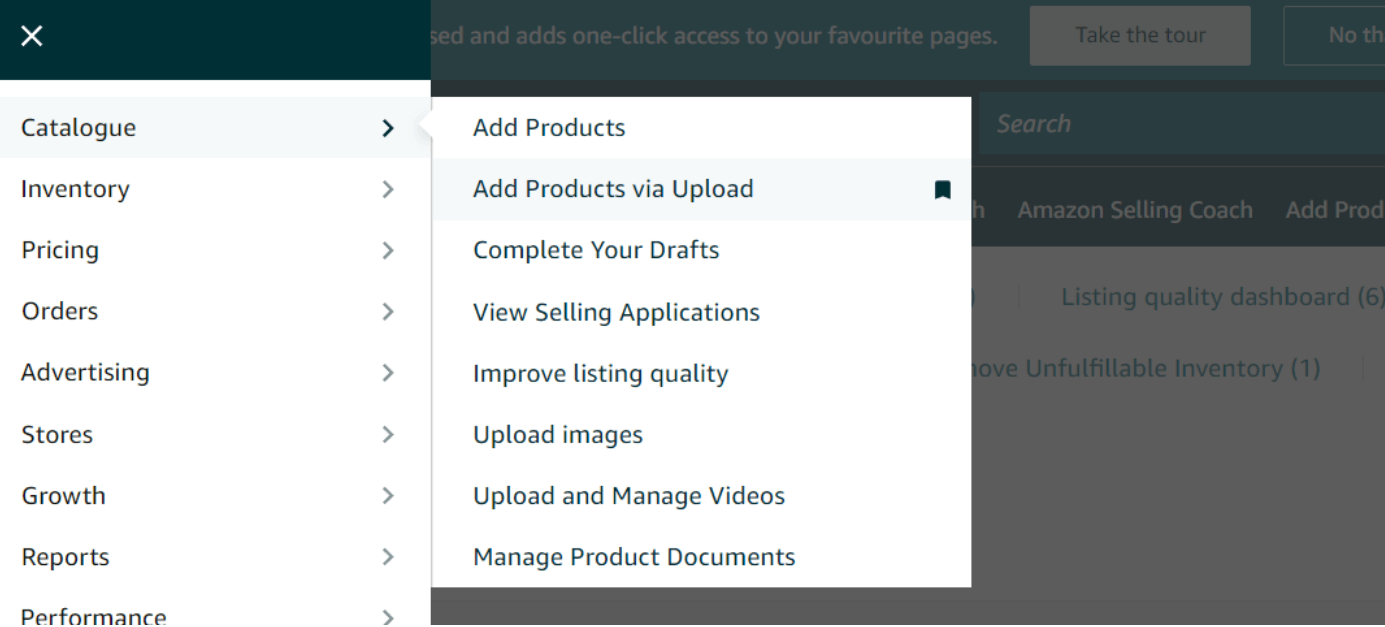
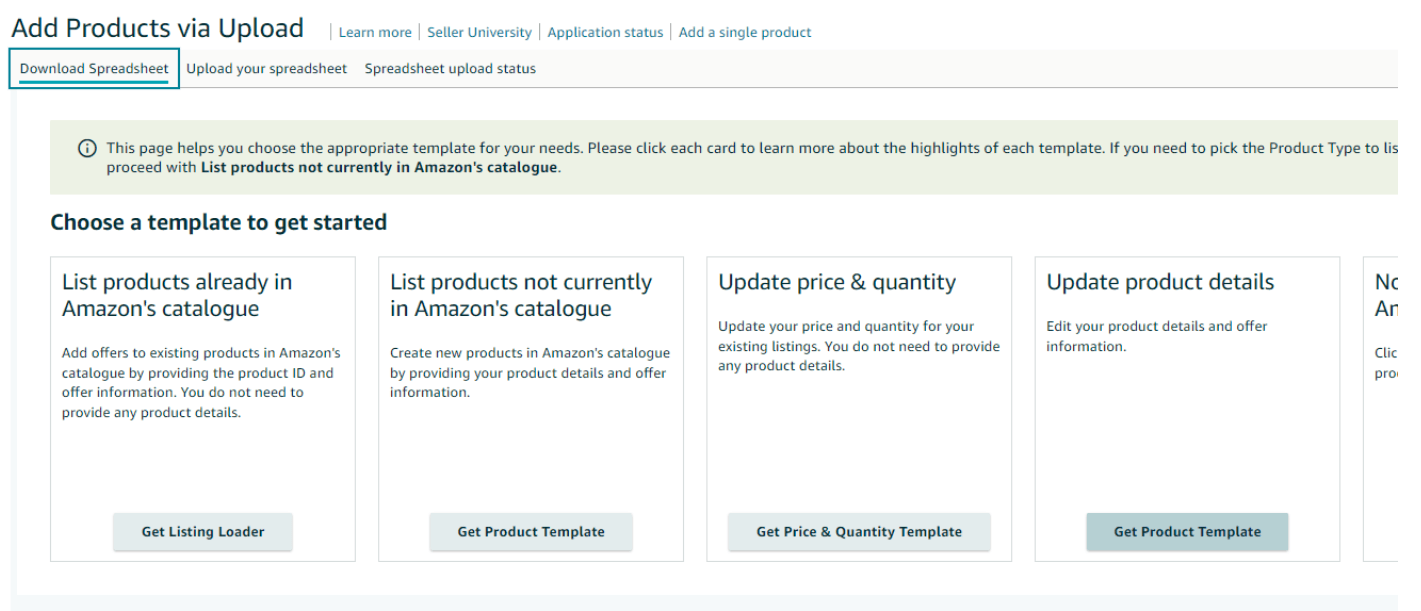
Under the ‘ Download Spreadsheet ’ section locate ‘ Update Product Details . Click on ‘ Get Product Template ’.

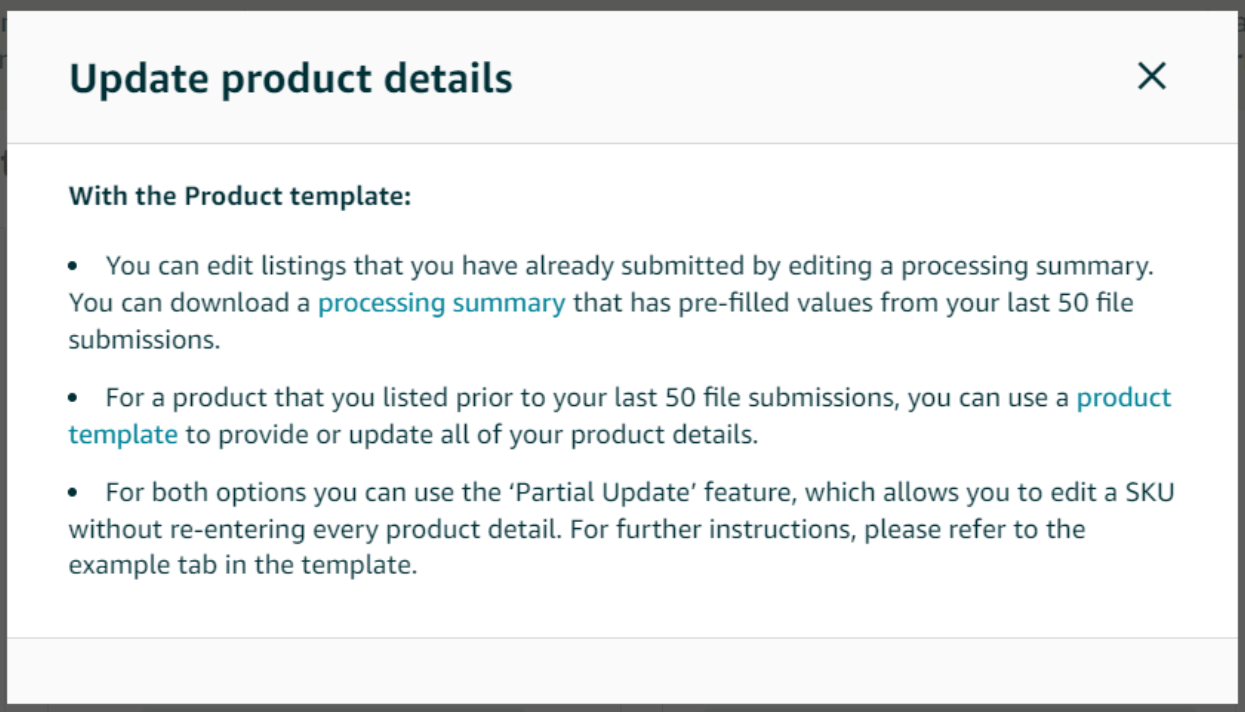
Now a window will pop up which says…

You can select either the ‘Processing Summary’ option if you have previously submitted a data feed in the past, or, select option 2 by clicking on ‘Product Template’ to generate a template file for the product subcategory.


Next, you have to choose the marketplace URL. You will be redirected to the template download centre. 


After cross-verifying with the ‘Recommended Node Point ’ from the previous EDIT Window, you need to locate the respective subcategory of the product.
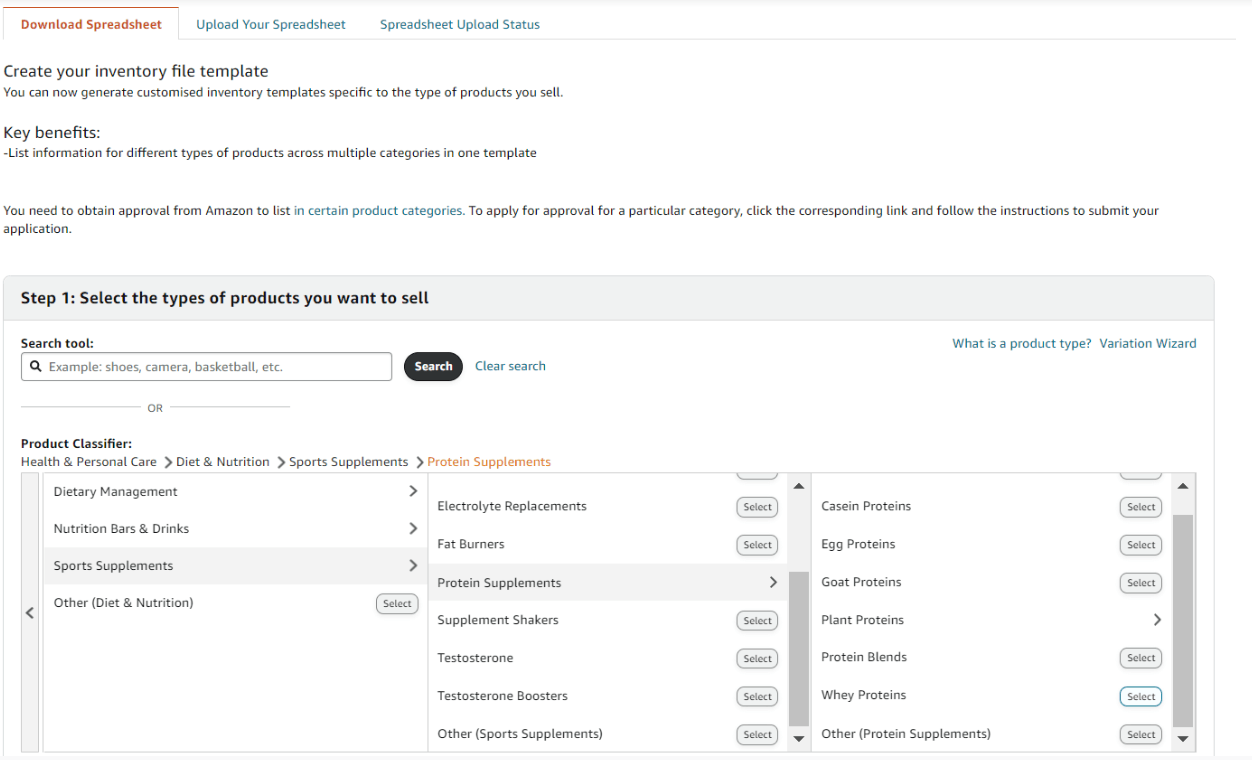
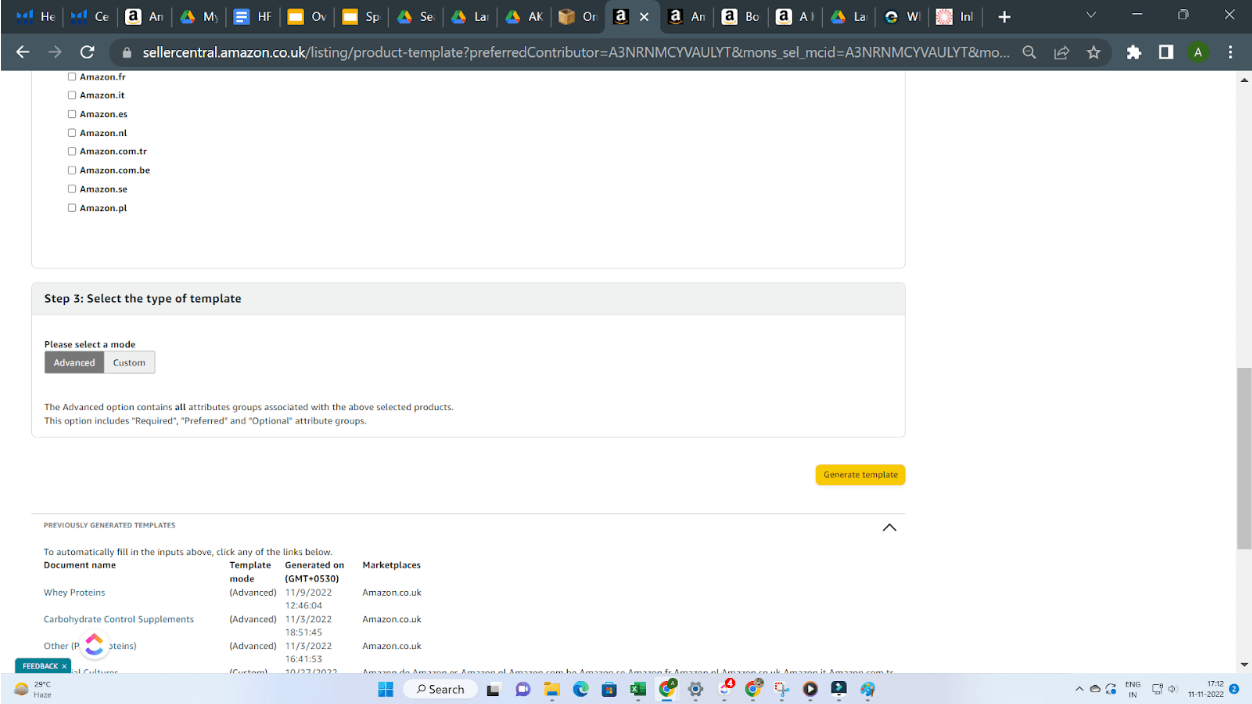
Now scroll below and click on ‘ Generate Template ’.

As you click on the Generate Template button, an excel file will be downloaded.


STEP 5


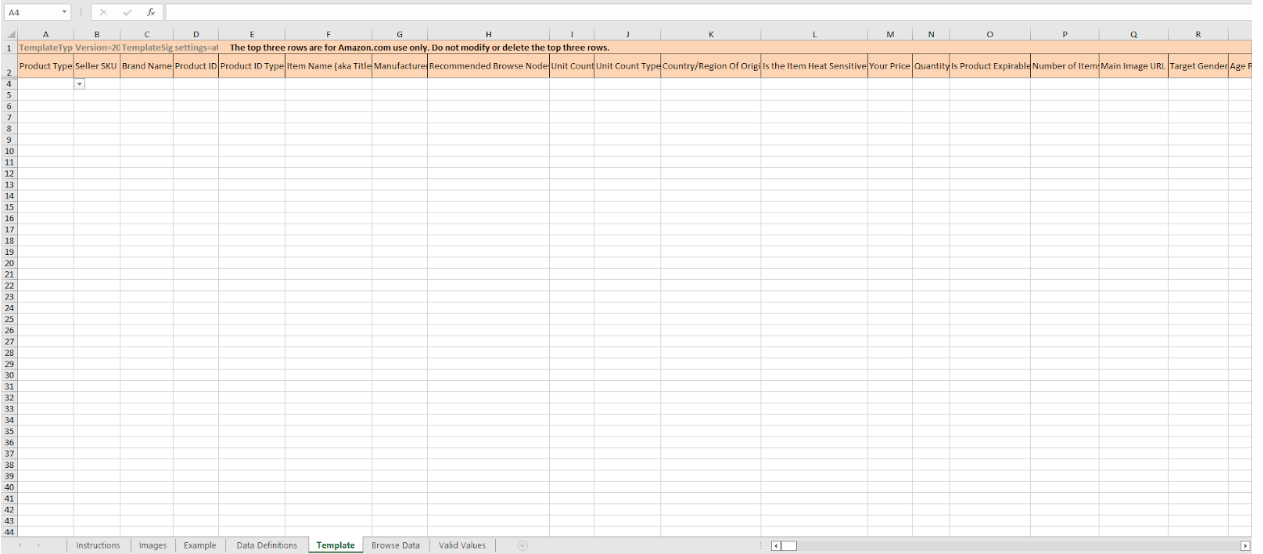
 Now you have downloaded the template file. It’s time to update the values on the sheet.

After opening the sheet, you will see various tabs, i.e. Instructions, Images, Example, Data Definitions etc.


HFSS updates are completed in the ‘Template Tab‘.
STEP 6


In this tab, we are only concerned with updating the HFSS-related information. Before providing that information ,we need to have obtained the following information…

  1. Product Type: You can obtain the product type data by going through the ‘Valid Values’ Tab.
  2. Seller SKU: SKUs can be found in the ‘Manage All Inventory’ section against the ASIN.
  3. Brand Name.
  4. Product ID: this can be either ASIN, UPC, GCID, EAN, or GTIN.
  5. Provide ID Type: Choose from the dropdown list or locate from the ‘Valid Values’ tab.
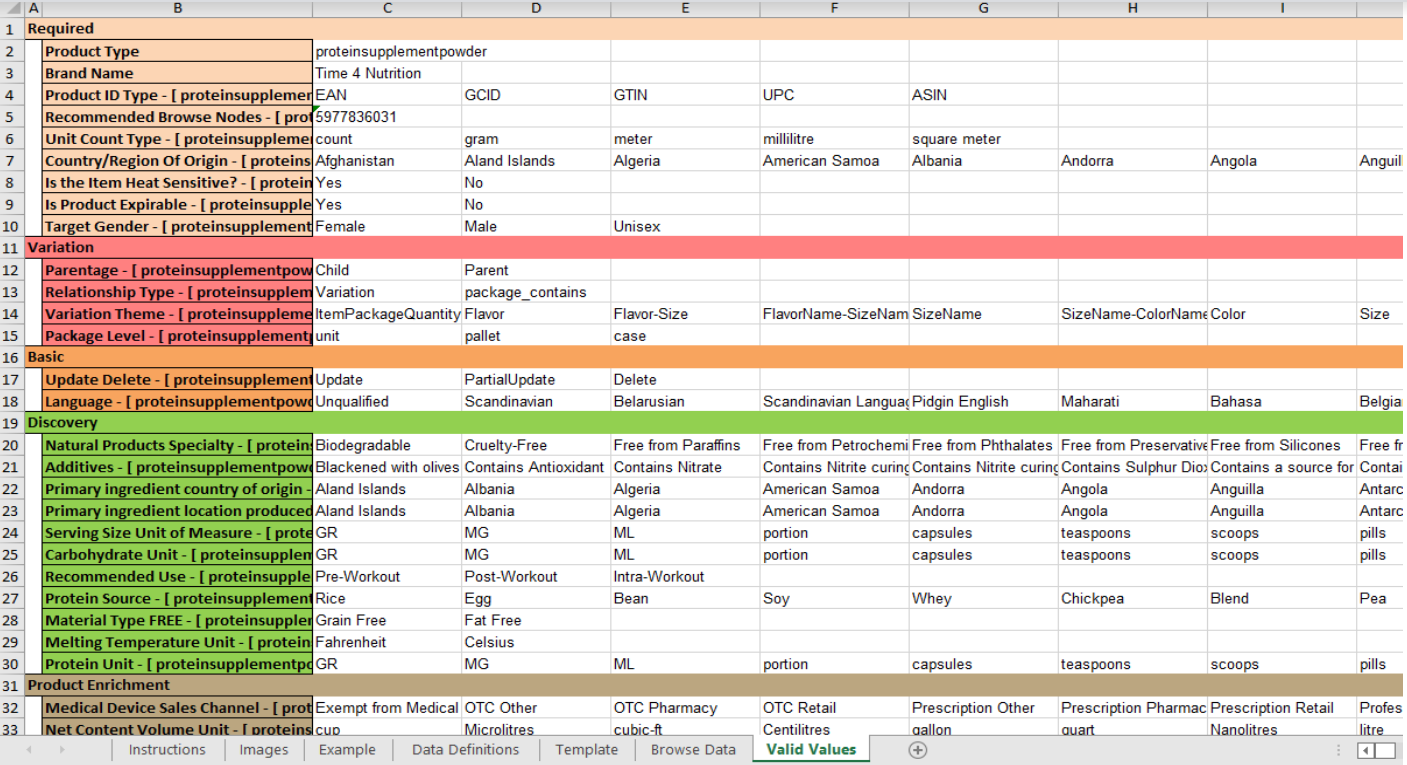

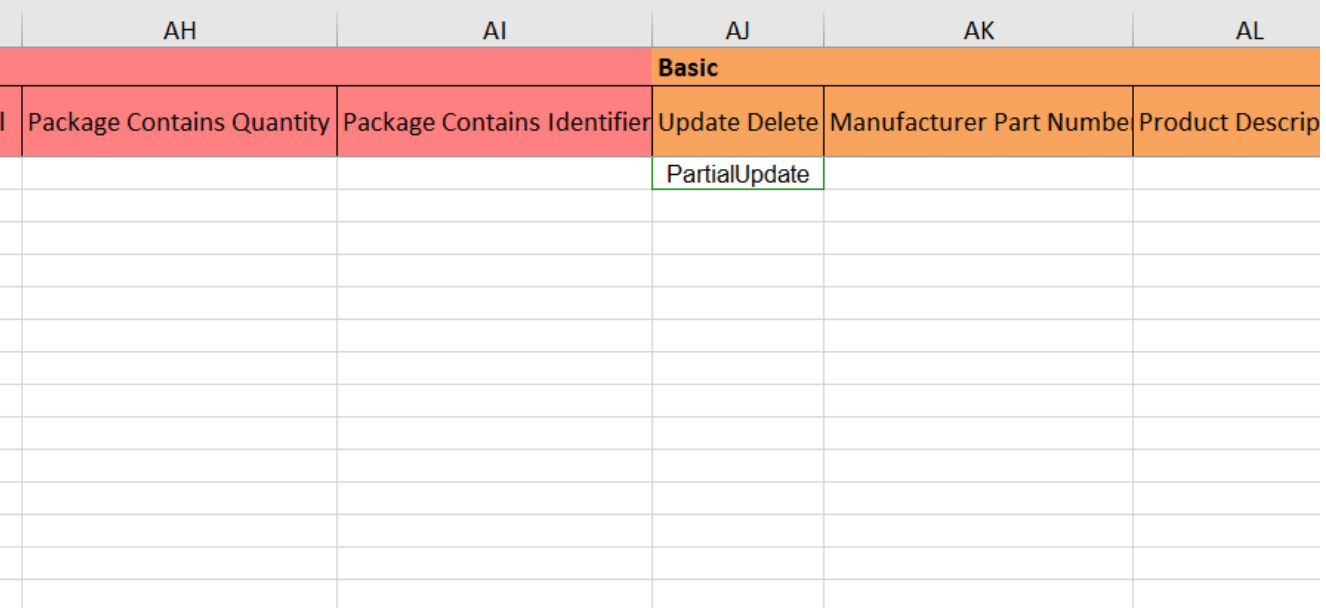
Since we are making a partial update to the present listing, choose ‘Partial Update’ in the ‘Update Delete ’ field.


This will tell Amazon that we are making a partial update, and the attributes we are providing will be updated, and the rest of the attributes will remain the same.
STEP 7

Now it’s time to fill in all the Nutritional Info you have gathered.


TIP: A quick trick, if you hit the ' Ctrl+F', you can quickly find and update all the missing attributes.
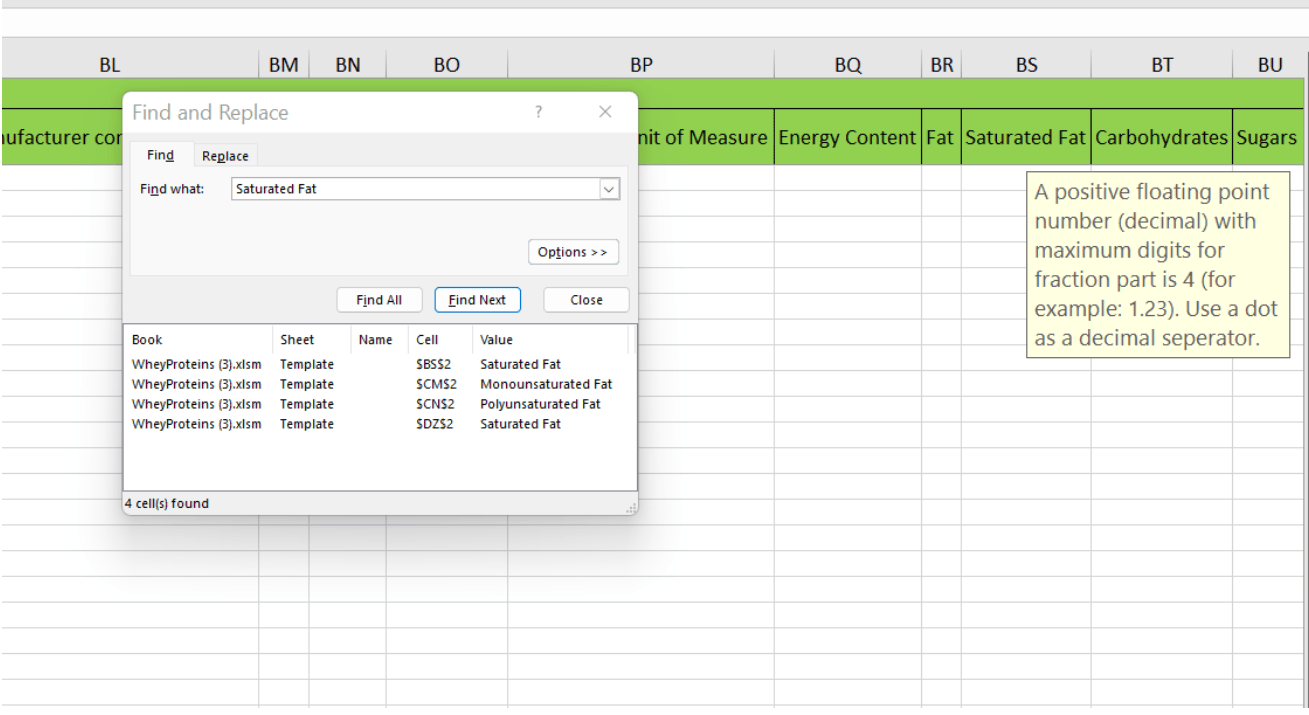
After updating all the values and their respective units, it’s time to upload the inventory file to Seller Central.


STEP 8


To upload the Update File, go to the ‘Upload Your Spreadsheet ’ and upload the feed file.
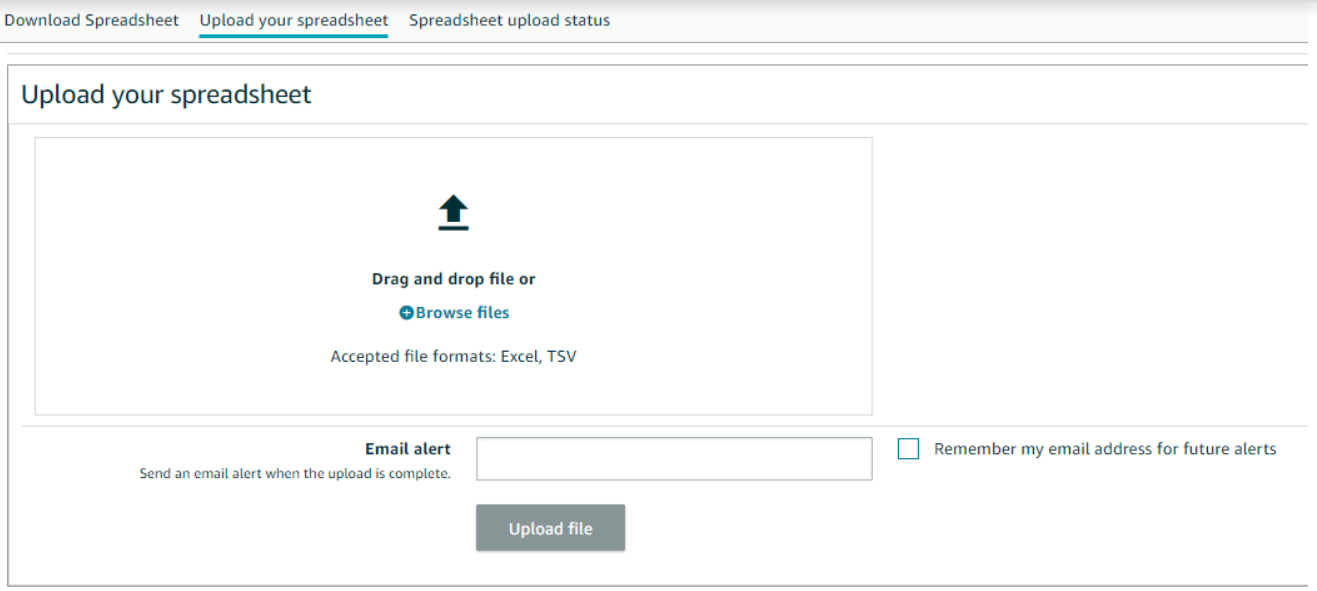
Hurray! You’re done. Just wait for 15 minutes to 1 hour, and your product will be indexed again.


STEP 9


In order to check whether your product is indexed or not, just type in Amazon’s search bar - ‘ASIN ’  + ‘’Your Primary Keyword ’.
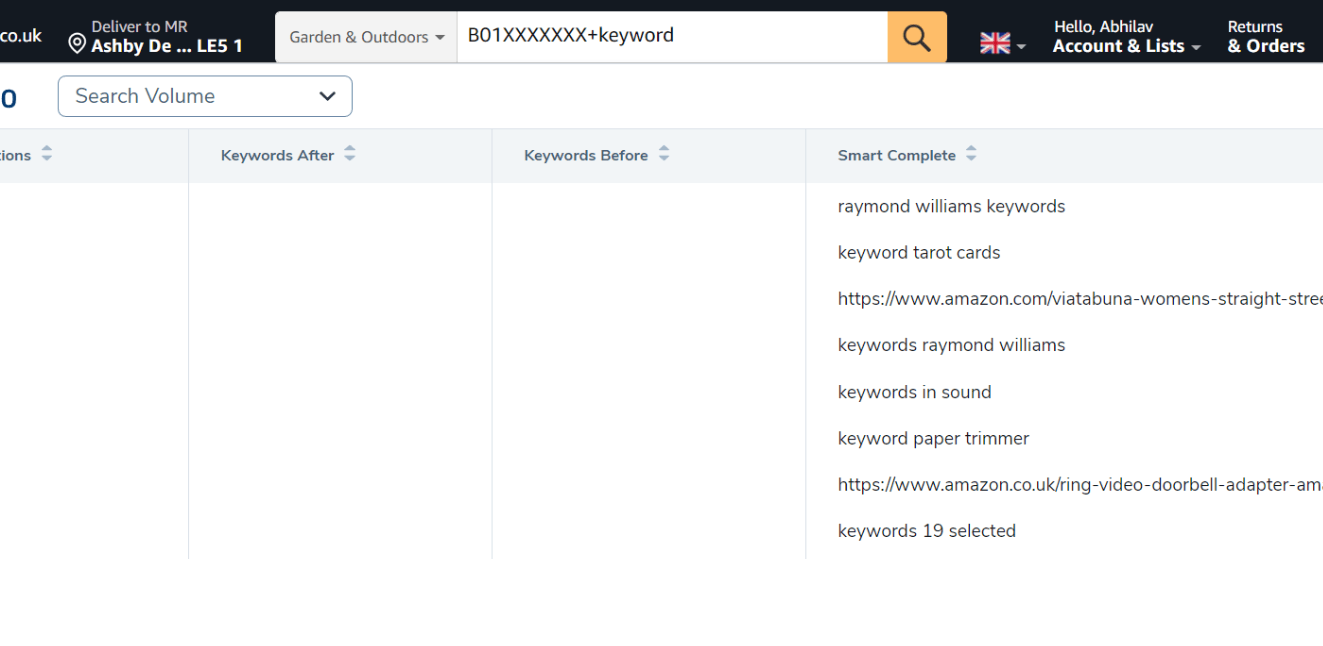
If your product is indexed, it will show on the search results page; if it's not indexed, it will not show up.

WELL DONE!  You have resolved the HFSS error on your product. 


Pro Tip


Advertising - It is good practice to double-check your ads are working again. We found that for some of our listings, we were immediately able to advertise again; however, in some cases, we found our listings as ‘Not Approved’. If this happens to you, you must contact Amazon Support to help resolve the issue.


Conclusion

Kangaroo UK offers a comprehensive Amazon account management service to a diverse range of Amazon sellers. If you have a problem or if you are spending too much time managing your Amazon account, and you think it's time to get some help, then contact us and talk to our friendly team. We’re here to help.
Two people looking at a laptop, pointing at the screen. Office setting, logo in background.
By Paid Ads December 17, 2025
Discover how the KangarooUK team delivers elite marketing power for less cost. Fair dinkum value for SMEs. Call us on 01530 560177 for a chat today!
Two men reviewing a computer screen in an office; one points, smiling.
By Peter Jones November 20, 2025
If you've ever felt the friction in a sales call when the topic turns to price, you're not alone. In the digital agency world, we're not just selling a product; we're selling a complex, high-value service.  How we package that service financially can be the single biggest factor in either building a partnership or hitting a brick wall. There isn't a single, one-size-fits-all approach. The truth is, the "best" model is the one that prioritises the client's immediate needs first, paving the way for a long-term, successful relationship. But this isn't just about how you price your services to your end-client. It's about the very structure of your agency. We see it all the time: talented WordPress agencies who are structured to only handle huge website builds, forcing them to turn away smaller, high-potential clients. We speak with exceptional branding agencies that want to offer a holistic service but find that building and supporting websites distract from their core expertise. This is where rigidity in your business model, not just your sales process, can cost you a perfect-fit client. The "Partnership-First" Approach to Pricing At KangarooUK , we’ve found that true success comes from seeing pricing not as a barrier, but as the first opportunity to build trust. This philosophy operates on two levels: For Direct Clients: Tailoring the payment model to demonstrate we are a partner invested in their success, not just a one-off provider. For Agency Partners: Acting as a specialist partner to help them say "yes" to more opportunities, capturing revenue they would otherwise have to refuse. Let's break down the flexible models that build better relationships on both fronts. Part 1: Flexible Models for Your Direct Clients First, let's examine the client-facing models, even if you plan to outsource the build. Offering these options positions you as a strategic consultant. 1. The Classic: Upfront Project Fees (with a twist) This is the traditional model: the client pays for the website build as a defined project. The Risk: A 100% upfront fee is a deal-breaker for many SMEs with tight cash flow. It can also frame the relationship as purely transactional. The project ends, you hand over the keys, and the partnership struggles to evolve into an ongoing retainer. The Smart-Flex: This is where milestone payments shine. For example, a 50% deposit to secure the project and commence design, with the final 50% balance due just before the new, conversion-driven website goes live. This is a powerful trust-builder. 2. The Relationship-Builder: The 12-Month Split Another highly effective, customer-centric model is splitting the website build cost over 12 months. This model is a game-changer for clients who need to manage their budgets predictably. It transforms a large, daunting capital expense (CAPEX) into a manageable monthly operational expense (OPEX). It’s flexible, predictable, and deeply appreciated by businesses that need to align their outgoings with their revenue. For the agency, it secures a 12-month commitment, naturally opening the door to bundling ongoing marketing retainers. 3. The All-In Partner: "Free" Site + Marketing Retainer This model takes the 12-month split a step further, rolling the entire cost of the build into a 24 or 36-month marketing retainer, presenting the website itself as "free." This is the ultimate low-barrier-to-entry model, powerfully attractive to new businesses. It positions you as a long-term partner from day one and secures predictable, long-term Monthly Recurring Revenue (MRR). Part 2: The Ultimate Flexibility: The Agency-to-Agency Partnership The models above are great, but what if the project itself doesn't align with your agency's needs? What about the client who needs a site, but your minimum project fee is too high? Or the client who needs a fast, scalable site on a platform you don't specialise in? This is where true flexibility wins. Instead of saying "no," you say, "Yes, we can handle that." As the UK’s only Duda Expert & Solution Partner, KangarooUK is built to be this partner for you. We work with clients, agencies, SaaS providers, and trade associations to deliver powerful websites and advanced functionality, allowing you to scale your services without the overhead. Here’s how a partnership model enables you to perform at scale: 1. White-Label Duda Development You can offer our services under your own name. We provide fully White-Label Duda Development in your own environment and brand, enabling you to expand services, clear backlogs, or roll out hundreds of client sites discreetly. With NDAs and silent partnerships, you keep full client ownership while we provide the technical power. This is the perfect solution for branding agencies that want to offer top-tier web design without an in-house development team. 2. Seamless Migrations to a Better Platform Many clients are stuck on slow, insecure, or hard-to-manage platforms like WordPress, Wix, or Mono. A partnership allows you to offer a high-value migration service. We migrate websites to Duda with minimal disruption, whether it's one site or thousands. Every migration is SEO-conscious, ensuring your client keeps their rankings while gaining a faster, safer, and more reliable platform—which you can then manage for them on a retainer. 3. Unlock Enterprise-Grade Tools Our Custom Plan Enablement Platform gives your agency access to Duda’s most powerful features—normally reserved for enterprise plans. You can integrate external datasets, manage an unlimited number of team members, and provide clients with a fully white-labelled environment featuring SSO and API access. This allows you to compete at an enterprise level without the enterprise overhead. 4. Advanced & Custom Solutions on Demand What about the client who needs a custom price calculator, a complex API integration, or even a mobile app? You don't need to build a new department. We handle the heavy lifting. Our team delivers secure, scalable solutions—from custom widgets to database solutions and mobile app builds—that work seamlessly for your client, under your brand. How to Choose the Right Model The secret isn't having a rigid price list. It's using your discovery phase as a diagnostic tool. When you get to the budget conversation, you're not a salesperson; you're a solutions consultant. Ask the right questions: "What's your current budget, and how flexible is it?" "Are there any financial deadlines or fiscal-year considerations we need to be aware of?" "What's more comfortable for your cash flow: a one-off project investment or a predictable monthly cost?" "Are you looking for a long-term partner to help you grow?" And most importantly, ask yourself: "Is this project a perfect fit for my core team, or could I deliver a better, more profitable result for both my client and my agency by using a specialist partner?" The Key Takeaway Being customer-centric and transparent about pricing isn’t just good for clients—it’s essential for agency health. When you tailor your approach, you build immediate trust. But true, sustainable flexibility comes from having the right partners in your corner. It allows you to offer flexible pricing (like the 12-month split) on a platform built for speed and reliability. It allows you to say "yes" to projects your old model would have forced you to refuse. At the end of the day, it’s not about which model is “right” in theory. It’s about which model—and which partner—solves the client’s entire problem.
Stack of coins on top of a financial chart, with a loose coin on the bottom right.
By Peter Jones October 29, 2025
Discover how we achieved explosive growth for our clients during the Prime Big Deal Days 2025.
Screenshot of a performance dashboard showing website clicks, impressions, CTR, and position.
By Devanshi September 26, 2025
In October 2025, Google will update its Google Ads Misrepresentation Policy, specifically targeting dishonest pricing practices.
Show More